Toddler Games for 2+ year olds
- 4.4
- Rating
- 10.00M
- Installs
- Free
- Price
 Analysis by App-foxy
I spent time with Toddler Games for 2+ year olds as a parent-focused educational game, and my first impression was that it understands a simple truth about very young children: learning works better when the activity feels like play. Instead of asking a toddler to sit through a lesson, it offers a collection of short activities built around recognition, memory, matching, and basic logic. That makes it easier to introduce during a quiet moment without turning the tablet into a formal classroom.
The game is free to install and aimed at Everyone, with the store presenting it for toddlers and preschool children. It comes from Bimi Boo Kids Learning Games for Toddlers FZ-LLC, a developer focused on early-learning experiences. The current version is 1.125, and the app has reached over ten million installs. Those figures do not automatically make it right for every family, but they do suggest that this is an established option rather than a small experiment.
My honest view is that this works best as a short, guided activity for children who are beginning to recognize patterns and follow simple instructions. It is not a replacement for conversation, drawing, physical toys, or hands-on preschool practice. Its strength is convenience: when I need a contained activity that still asks a child to think, it gives me more substance than a passive video.
You May Also Like

 Blood Strike: 2.5 Anniversary
Blood Strike’s Loadouts Turn Every Drop Into a Tactical Gamble
A close look at Blood Strike’s custom loadouts: how fast access to signature weapons reshapes its battle royale rhythm, rewards preparation, and narrows the gap between fights.

 Pandora - Music & Podcasts
Pandora’s Music Is Easy to Start, but Harder to Recover
Pandora’s strength is its low-effort path from a seed to a station. Its weak spot is how much confidence it asks you to place in connection, setup, and quiet recovery.

 8 Ball Pool
 Is Built on Rivalries, Rematches, and Routine
A close look at the rivalries, rematches, shared routines, and unanswered safety questions that turn a quick pool match into a persistent mobile community.

 Samsung Music
’s Quiet Strength Is Playing What You Already Own
Its reach comes less from spectacle than from dependable access to a personal library. That simplicity is both the app’s strongest retention engine and its ceiling.

 AccuWeather: Weather Radar
AccuWeather Review: A Quick, Clear Forecast for Everyday Decisions
For everyday plans, the best forecast is the one you can understand quickly. AccuWeather makes rain timing, radar, and local conditions easy to act on, with a few trade-offs.

 Hill Climb Racing
Why Hill Climb Racing Still Turns Crashes Into One More Run
A tiny car, a bumpy hill and one more upgrade: Hill Climb Racing keeps resurfacing because its simple chaos makes every near-miss feel personal.
More From Our News Desk



How the current version feels in everyday use
I find the current version easiest to judge through a few brief, supervised sessions rather than a long first try: that gives a toddler time to get used to tapping while letting me see which activities hold their attention. I’d also choose a calm moment, so the game is not competing with hunger or tiredness. From there, a simple routine makes it easier to decide what to check before handing over the device.
A broad set of small activities rather than one long game
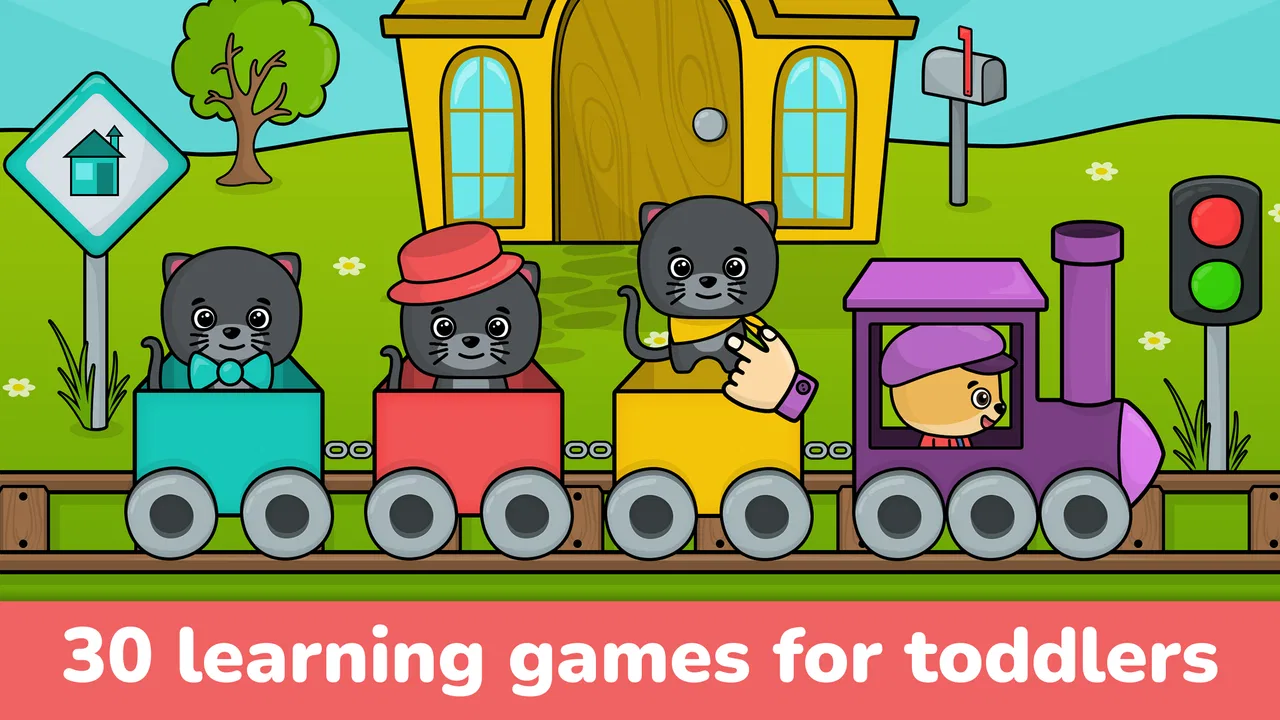
The central idea is a collection of thirty educational games. That variety matters because toddlers can lose interest quickly, and a single repeated mechanic may stop holding their attention after a few sessions. Moving between memory and logic-style tasks gives parents a chance to find the activities that suit a particular child’s current abilities.
I would not treat every activity as equally valuable for every age. A child who is just learning to tap accurately may need help with the basic interaction before the learning goal becomes clear. Another child may move quickly through the easiest matching tasks and need encouragement to slow down and explain what they noticed. The app is more useful when I adjust my expectations instead of assuming that a two-year-old and a preschooler should use it in the same way.
The short-game format also makes it practical for real routines. I can imagine using it while waiting for an appointment, during a calm period before dinner, or on a travel day when familiar physical activities are not available. I would keep the session brief and stay nearby, especially with a younger child. The point is not to occupy a child for as long as possible; it is to create a small opportunity to notice, choose, remember, and try again.
What the learning focus does well
Memory and logic are broad labels, but they describe useful early skills when handled gently. A toddler may practice remembering where something appeared, identifying a visual relationship, or choosing an item that fits a simple rule. These are small steps, yet they can support the same habits parents encourage with picture cards, sorting toys, and “what comes next?” questions.
The digital format has one particular advantage: it can respond immediately when a child makes a choice. That can keep the activity moving without requiring an adult to reset cards or gather pieces. At the same time, immediate feedback is not the same as understanding. I get more value from sitting beside the child and asking, “Why did you choose that?” rather than letting the app become a silent tapping exercise.
The best results come when the screen starts a conversation instead of replacing one. After a matching activity, I can continue with real objects in the room: find two things that are the same color, sort spoons and cups, or remember where a toy was placed. This turns a short digital game into a bridge toward offline learning, which is much more meaningful than treating a correct tap as the entire lesson.
Using it with a two-year-old
The “2+” positioning is important because children at this stage vary enormously. Some can follow a simple visual instruction, while others are still developing the hand control needed for precise tapping. I would introduce the app with an adult present and watch whether the child understands the task or is simply touching every part of the screen.
A useful approach is to demonstrate one round without immediately taking over. If the child struggles, I can describe the goal in plain language and point toward the relevant choices without completing the activity. That small pause gives the child a chance to process the pattern. If frustration rises, stopping is better than turning the game into a test.
For a preschooler, the same activities may become more independent. I can let the child attempt a task alone, then ask for an explanation afterward. This helps reveal whether the child is remembering a rule or merely repeating a successful gesture. It also gives the app a longer useful life across early childhood, even though the experience may feel simple to an older preschool user.
What has changed and what that means
The game was released on March 25, 2016, and its current version is 1.125. That combination tells me I am looking at a product with a long development history rather than a newly launched title. A mature version can be reassuring for families who prefer an established app, but it also means parents should judge the present experience instead of assuming that age alone guarantees modern design.
From a user’s perspective, the most important effect of ongoing version work is stability and continued access to the existing collection. I would still check that the app behaves comfortably on the child’s device before planning to use it during travel or a waiting-room visit. Young children are especially sensitive to small delays, confusing transitions, or controls that respond differently than expected.
The version number itself does not tell me that the educational approach has been transformed. What I can say is that the current release preserves the identity of a compact early-learning game built around multiple activities. Families already using it are likely to appreciate continuity: a child can return to familiar tasks rather than having to learn an entirely new structure after an update.
For a new user, the practical lesson is to explore the activities first. I would not hand the device over and assume that the child will naturally discover the best sequence. Start with tasks that feel understandable, then move toward activities that require a little more memory or comparison. This creates a gentle progression without pretending the app is a complete curriculum.
Free access and the point where costs matter
The game is free, but it includes in-app purchases ranging from $0.99 to $5.99 per item. That makes the initial decision easy: I can install it and see whether the child responds well before spending anything. For parents, that trial value is useful because interest in a toddler game is hard to predict from screenshots or a description.
The trade-off is that “free” should not be confused with an entirely open experience. Before giving the device to a child, I would look through the available activities and understand which parts are accessible without a purchase. I would also keep purchase controls out of the child’s reach. A toddler should not be the person deciding whether an optional item is worth buying.
For a family on a tight budget, the free starting point may be enough if the child enjoys only a few activities. For a family seeking a large, fully open learning library with no purchase decisions, a paid app with one clear upfront cost may feel simpler. I prefer evaluating the actual value of the activities my child returns to, rather than buying everything just because the options are available.
Where it fits beside familiar alternatives
Compared with videos, this game asks the child to make choices and remember information, so it is the stronger option when I want active participation. Compared with physical puzzles or sorting toys, it is more portable and easier to start, but it cannot provide the same tactile feedback or open-ended manipulation. Compared with a structured preschool program, it is lighter and more flexible, yet far less comprehensive.
That difference helps clarify who should choose it. I would recommend it to a parent looking for a convenient supplement, especially when a child enjoys visual tasks and benefits from quick rounds. I would not choose it as the only educational resource for a preschooler who needs handwriting practice, physical coordination, language-rich interaction, or imaginative play.
There is also a difference between this collection and highly specialized learning apps. A dedicated phonics or early-math product may be better when a child has one clear learning goal. This game is broader, which is helpful for exploration but less suitable when I want to follow a carefully sequenced skill program. Its value is variety, not deep instruction in one subject.
Small details that improve the experience
One practical tip is to use the app as an observation tool. I can notice whether a child remembers a pattern after a short pause, whether they scan the whole screen before tapping, and whether they recover after an incorrect choice. Those observations are more useful than simply counting successful rounds because they show how the child is approaching the task.
A second tip is to alternate digital and physical versions of the same idea. If the game presents a memory challenge, I can follow it with a very small memory game using household objects. If it involves matching, I can ask the child to pair socks or find similar shapes. This prevents the skill from becoming tied only to the tablet and gives the child a chance to transfer it into ordinary life.
A third useful habit is to stop while the child is still interested. Because the activities are short, there is no need to squeeze every possible round from one sitting. Ending after a successful attempt can make the next session easier to begin, while pushing through tiredness may create the impression that the game itself is frustrating. This is especially important for children who are still learning to manage attention.
I would also keep the device positioned so that an adult can see what is happening. A child may appear to be progressing while actually guessing rapidly, and a parent can gently slow the process with a question or demonstration. That supervision does not need to feel like teaching a lesson; a few words of encouragement are enough to turn passive tapping into deliberate thinking.
Remaining gaps and likely frustrations
The main limitation is that a collection of simple activities cannot adapt perfectly to every child. A task may be too easy for one preschooler and too demanding for another toddler. Without an adult adjusting the pace, the experience can become either repetitive or discouraging. I see this as a reason to use the game selectively, not as a flaw that makes it unusable.
Another gap is the distance between screen success and real-world ability. A child may perform a visual match on a bright display but still need practice recognizing the same relationship with physical objects. Parents expecting the app to produce measurable progress on its own may be disappointed. The stronger approach is to use each activity as a prompt for play away from the screen.
There is also a natural ceiling for children who want richer stories, more complex challenges, or creative freedom. Once a child understands the basic patterns, the novelty may fade. In that situation, a physical construction set, a picture-book conversation, or a more advanced educational app could offer better growth. I would not keep this installed solely because it once worked well at a younger age.
The purchase structure may be another source of friction for some households. Even small optional items require attention from the adult managing the device. Families that value a completely predictable experience may prefer an alternative with one transparent payment, while families that want to test the game first may appreciate the free entry point.
Who should try it, and who should skip it
I think it is a good fit for toddlers and younger preschoolers who enjoy visual matching, short challenges, and repeated practice. It is especially practical for parents who want something more interactive than a video but less demanding to organize than a full table activity. The Everyone rating also makes its intended audience clear, although adult supervision remains sensible for such young users.
I would be more cautious if a child becomes upset by mistakes, struggles with touch controls, or is already bored by very simple patterns. In those cases, a physical activity may be kinder and more useful. I would also skip it as a primary choice if my goal were early reading, detailed numeracy, speech development, or a structured lesson plan.
The developer’s focus on toddler learning is evident in the app’s compact, accessible concept, but no single collection can match every family’s teaching style. Some children learn best by moving, talking, building, or handling real objects. The game should support those experiences rather than compete with them.
What I would watch over time
When deciding whether to keep using it, I would watch for three things: whether the child begins to pause before tapping, whether they can describe the rule behind a choice, and whether they can apply a similar idea away from the screen. Those signs tell me more than how quickly the child completes an activity.
I would also pay attention to how the current version continues to serve existing users. For a long-running app, useful evolution should preserve the familiar entry point while keeping the experience comfortable on current devices. I would welcome improvements that make progression clearer or help parents understand the purpose of each activity, but I would not assume such changes without seeing them in the app itself.
For now, my recommendation is measured but positive. This is a convenient educational game with enough variety to earn a place in a toddler’s occasional screen-time rotation. Its strongest feature is not that it turns a tablet into school; it is that it gives a young child small, manageable chances to remember, compare, and choose. Used with an adult, balanced with offline play, and approached as a supplement, it can be genuinely useful.
With a 4.4 average from around sixty-two thousand ratings and about 1.4 thousand written reviews, it has attracted substantial feedback from families. I would still make the decision based on the child in front of me. If that child enjoys short visual challenges, the free starting point makes trying it reasonable. If they need tactile play, richer language, or more advanced instruction, I would choose another tool and let this one remain optional rather than forcing it to do a job it was not designed to handle.
FAQs for Toddler Games for 2+ year olds
01What age group is Toddler Games for 2+ year olds suitable for?
Toddler Games for 2+ year olds is specifically designed for children aged 2 to 5. The app includes activities and games that are developmentally appropriate, engaging young minds while promoting learning through play. Parents can rest assured that the content is safe and tailored to the cognitive abilities of toddlers.
02What types of games are included in the app?
The app features a variety of games that focus on developing essential skills such as counting, colors, shapes, and basic problem-solving. There are also creative activities like drawing and matching games that stimulate creativity and enhance motor skills, ensuring a balanced approach to early childhood development.
03Is the app safe for my child to use?
Yes, Toddler Games for 2+ year olds prioritizes child safety. It is free from in-app purchases and advertisements, ensuring a secure environment. The app is designed to be user-friendly for toddlers, with intuitive controls and no external links, preventing them from accidentally navigating away from the app.
04Can the app be used offline?
Yes, once downloaded, Toddler Games for 2+ year olds can be used offline. This allows children to enjoy the games without an internet connection, making it a perfect travel companion or an ideal option for areas with limited connectivity. Parents can be assured of uninterrupted playtime.
05Are there any parental controls available?
The app includes parental controls to help manage screen time and content access. Parents can set usage limits and monitor game progress, ensuring that their child engages with the app within healthy boundaries. These features provide peace of mind while allowing children to explore and learn independently.
Pros
- Engaging colorful graphics
- Simple interface for toddlers
- Educational mini-games included
- Parental control settings available
- Offline play supported
Cons
- Limited free content
- In-app purchases can add up
- Repetitive gameplay
- Requires frequent updates
- Ads may interrupt play

Toddler Games for 2+ year olds
Gallery